PureImageRemove metadata from Word, Excel and PowerPoint files

Remove metadata from Word, Excel and PowerPoint files.

An Office file carries more than what you typed: the author and the company, who saved it last, the path to your template with your Windows user name in it, who wrote each comment and tracked change, and where the photos in it were taken. PureDoc takes it out on your own computer, offline, and leaves your text, cells and pictures as they were.

  • runs offline
  • nothing uploaded
  • DOCX · XLSX · PPTX
  • pictures not re-compressed
  • one-time $14.99

Not sure what your file carries? Check a document first, free and read in your browser.

PureDocClean receipt
project-proposal.docx#886ec2e9
DOCX · 43 KB · Word document2026-11-21

This document carried names, file paths, dates, comment and change details, a photo location, properties, and hidden parts. All of it is gone now.

Names

AuthorKim Example
Last saved byRobin Reviewer
ManagerJordan Lead
CompanyExample Trading Ltd
Person in the people listRobin Reviewer, Kim Example

File paths

Template pathC:\Users\kim.example\AppData\Roaming\Microsoft\Templates\Proposal.dotx
Picture file namessite-visit.jpg

Dates & times

File dates in the ZIP2026-11-18 08:05
Created2026-10-14 09:15
Modified2026-11-18 08:05
Last printed2026-11-17 16:40
Editing time5 hours 12 minutes

Comments & changes

Change authorKim Example
Change dates2026-11-18
Comment authorRobin Reviewer
Comment initialsRR
Comment dates2026-11-17

Photo data

CameraPhone maker Phone 12 Pro
SoftwareCamera app 17.1
Changed2026-10-09 14:21
Taken2026-10-09 14:21
GPS position59.3321° N, 18.0677° E

Properties & ids

TitleProject proposal, draft 2
SubjectWarehouse move 2027
Keywordsproposal, warehouse, budget
Revision number14
Template nameProposal.dotx
Made withMicrosoft Office Word
App version16.0000
Statistics1 page, 62 words, 356 characters
Other fields: 3 more

Hidden parts

Thumbnaila small picture of the first page, JPEG 8.1 KB

Kept

Text and layoutevery word, untouched
Tracked changes1 change, kept with names replaced by "Author"
Comments1 comment, kept with names replaced by "Author"
Package checkevery part and link in place

Hidden fields left0
Parts removed3
Size43 KB → 39 KB
Uploaded0 bytes

Removed34 fields

Processed on this device. Nothing left it.
A real PureDoc receipt for a sample Word file. The sample's metadata is made up (fictional people and company); the removal is real.

What your documents give away

A .docx, .xlsx or .pptx file is a ZIP package of many parts. Word, Excel and PowerPoint show you the content; the other parts hold who made the file, where, when and with what, and they travel with it wherever you send it.

Names and company

The author and the person who saved the file last, Company and Manager, custom properties, and the list of people Word, Excel and PowerPoint keep for comments.

File paths

The full path of the template a Word document was made from, often with your Windows user name in it. In Excel, the folder the workbook was last saved in and the full paths of linked workbooks (cut to the file name).

Comments and changes

Every author and initial on comments, notes and tracked changes becomes "Author", and their dates go. The comments and changes themselves stay, unless you remove all comments or, in Word, accept all tracked changes.

Photo data

Pictures pasted into a document can carry a GPS position, the camera and dates. That data is cut out of JPEG, PNG and TIFF pictures without re-compressing them.

Dates and statistics

Created, modified and last printed dates, total editing time, revision number, the program and its version, page and word counts, and the dates stored in the ZIP package itself.

Hidden parts and ids

The first-page thumbnail, printer settings with the printer's name, revision-save ids (rsids) that link edits to editing sessions, document ids, PowerPoint revision info and Excel shared-workbook history.

How PureDoc cleans a document

PureDoc is one HTML file you open in your browser. It is not even allowed to use the network, so it works with the internet unplugged.

Unzip and open

Download the ZIP, unzip it and double-click PureDoc.html. It opens in Chrome, Edge or Firefox. Nothing to install.

Drop your files

Drop one Word, Excel or PowerPoint file or many at once. Each file is read on your computer and written again as a new, clean copy.

Check the receipt

Every file gets a receipt of what was found and removed, and a read-back of the clean copy ("Hidden fields left: 0"). A copy in which a link inside would point at nothing is not handed out.

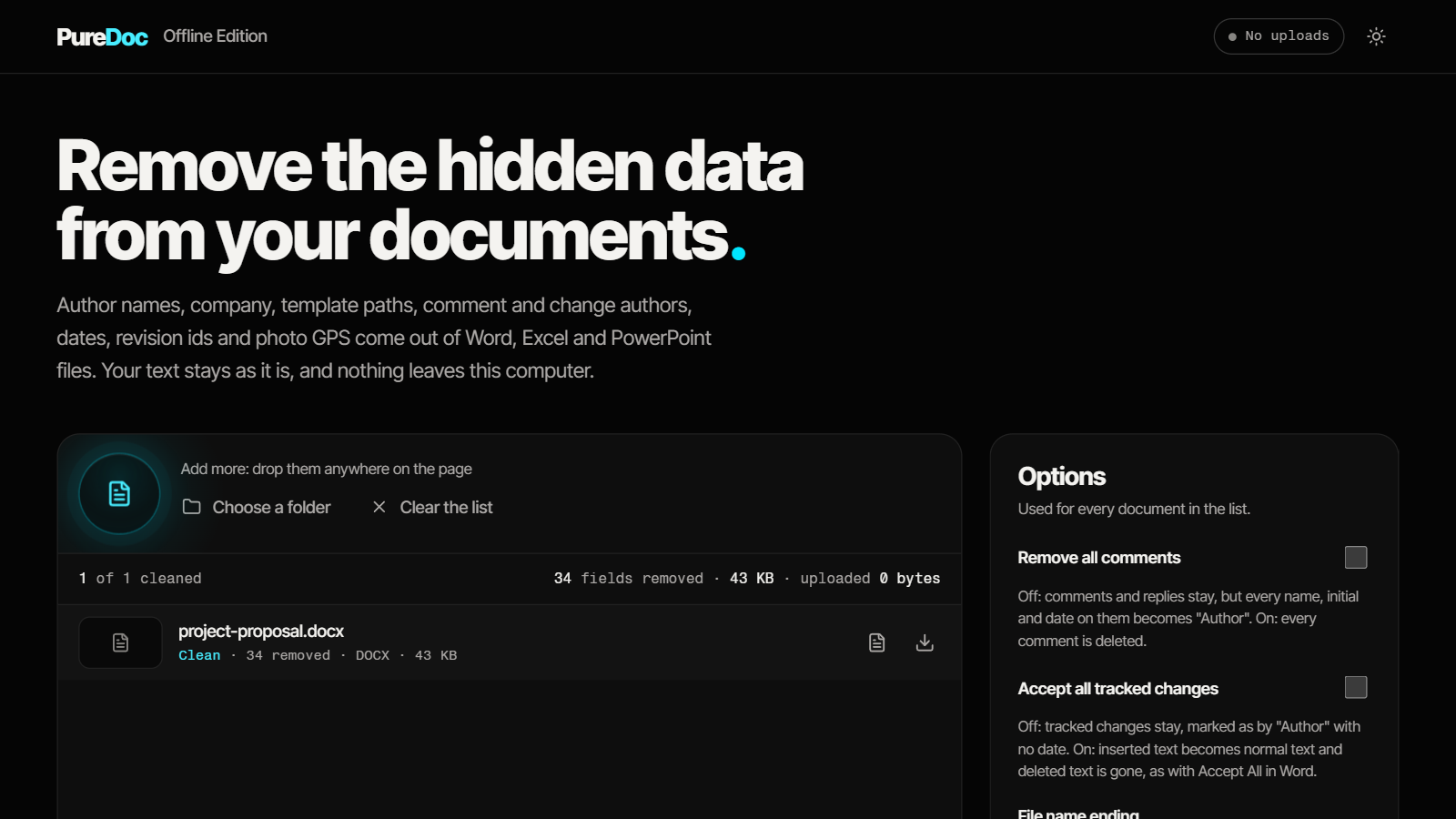
PureDoc after cleaning the sample Word file: 1 of 1 cleaned, 34 fields removed, uploaded 0 bytes, next to the options for comments and tracked changes
PureDoc after cleaning the sample Word file (made-up metadata, real removal).

Why PureDoc is different

Your content stays as it was

PureDoc changes only the metadata inside the file, with its own XML reader that keeps everything else, and copies every other part as its original compressed bytes. The checks find the text, cell values and formulas unchanged, and pictures identical pixel for pixel.

Nothing is uploaded

PureDoc runs on your computer, and its security policy blocks every network request, so it works with the internet unplugged.

Hidden things are shown, not deleted

Hidden sheets, hidden slides, hidden text and speaker notes are listed on the receipt and kept, so you decide what to do with them.

Show, don't claim

After cleaning, PureDoc reads the new copy again and prints what is left on the receipt, together with a check that every part and link inside the file is in place.

Clean every document before you send it.

One HTML file that opens in Chrome, Edge or Firefox. No install, no subscription, and no upload: the page has no permission to use the network.

  • Word, Excel and PowerPoint files and their templates, also with macros (the macros are kept, and the receipt says so).
  • Drop one file or many at once.
  • Comments and tracked changes stay with every name replaced by "Author"; two switches remove all comments or accept all tracked changes (Word).
  • Password-protected files, old .doc, .xls and .ppt files, .xlsb and OpenDocument files are refused with a plain message.
  • Tested with a 110 MB presentation.
  • Tested in Chrome, Edge and Firefox on Windows; not yet on a Mac or Linux.
PureDocOffline Edition: one file, yours to keep.
Get PureDoc

Checkout and download through Gumroad. PureDoc runs on a computer, in Chrome, Edge or Firefox.

What PureDoc does not do

How PureDoc is tested

Test files carry hidden data in the places Office writes it. A clean copy passes only if none of it is left in any part, every picture decodes to the same pixels, the text, cell values and formulas are unchanged, and no link inside the file is broken that was not broken before.

135

real Word, Excel and PowerPoint files cleaned, 35 of them written by Microsoft Office itself. No engine failure, and Microsoft's Open XML SDK validator found no new error in any clean copy.

0

failures in 1003 checks on 42 clean test copies, made by a Python checker that shares no code with PureDoc: no planted value left, pictures identical pixel for pixel, text, cells and formulas unchanged.

3

browsers run the page in the tests: Chrome, Edge and Firefox on Windows. The downloaded copy matches the engine's own output part by part, and the page makes no network request.

Opened in Office: six clean test copies (Word, Excel and PowerPoint) were opened in Microsoft's Office for the web and showed their content without an error. Not tested yet: the desktop versions of Word, Excel and PowerPoint, LibreOffice, a Mac, Safari, and files over 4 GB. If a receipt looks wrong for one of your files, write to support@karelialabs.com.

Questions

Is my document uploaded?

No. PureDoc is a file you open in your browser, and its security policy blocks every network request, so it also works with the internet unplugged.

How do I remove the author from a Word document?

Drop the file into PureDoc. The author, the person who saved it last, the company and the manager are removed, the names on comments and tracked changes become "Author", and the receipt lists each one.

Does it remove the template path with my user name?

Yes. Word stores the full path of the template a document was made from, often with your Windows user name in it. PureDoc resets it to Normal and lists the old path on the receipt.

What happens to comments and tracked changes?

By default they stay, with every author and initial replaced by "Author" and their dates removed. You can also remove all comments, and in Word accept all tracked changes.

Does it remove the GPS location from photos in a document?

Yes, from JPEG, PNG and TIFF pictures: EXIF, GPS, XMP, IPTC and text data are removed without re-encoding the picture, and its orientation is kept.

Which files does it support?

Word (.docx, .docm, .dotx, .dotm), Excel (.xlsx, .xlsm, .xltx, .xltm) and PowerPoint (.pptx, .pptm, .potx, .potm, .ppsx, .ppsm). Not supported: old .doc, .xls and .ppt files, .xlsb, OpenDocument and Visio files, and password-protected files.

Will the clean file open in Word, Excel and PowerPoint?

That is what it is built for: PureDoc removes each part together with every link to it, does not hand out a copy in which a link would point at nothing, and Microsoft's Open XML SDK validator finds no new error in the clean copies. Six clean test copies were opened in Word, Excel and PowerPoint for the web (the viewer Microsoft runs) and showed their content without an error. The desktop apps have not been tried yet.

Does it remove hidden sheets, slides or speaker notes?

No. They are content, so PureDoc lists them on the receipt and keeps them, and you decide what to do with them.

Does it work on a Mac?

It is a plain web page, but so far it has been tested on Windows only, in Chrome, Edge and Firefox.

Is it a subscription?

No. $14.99 once, for one HTML file you keep.

Can I try it first?

There is no free test of PureDoc. What you see on this page is a real receipt from the tool, made from a sample Word file with made-up metadata, and the price is one-time: $14.99, no subscription.

PDFs, photos and videos too