PureImageRemove metadata from PDF files

Remove metadata from PDF files.

A PDF carries more than its pages: the author's name, the company, the program it was written in, when it was created and changed. A PDF that was edited and saved often still holds its earlier version inside the file. PurePDF takes all of it out on your own computer, offline, and keeps every page exactly as it was.

  • runs offline
  • nothing uploaded
  • pages not re-rendered
  • writes a new file
  • one-time $14.99

Not sure what your PDF carries? Check a PDF first, free and read in your browser.

PurePDFClean receipt
quarterly-report.pdf#4e8115fa
PDF 1.3 · 16 KB · 3 pages · A42026-11-21

This PDF carried names, a GPS position, the software used, dates, earlier versions of itself and attached files. All of it is gone now.

Location

Photo location59.332056, 18.067722

People

AuthorK. Example
Custom field: CompanyExample Trading Ltd
Author (XMP)Kim Example
Comment authorRobin Reviewer

Device

Photo cameraPhone maker Phone 12 Pro

Software

ApplicationWord processor 16.0
PDF producerPDF converter 11.2
Application (XMP)Word processor 16.0
Photo softwareCamera app 17.1

Time

Created2026-10-14 09:15 +02:00
Modified2026-11-18 08:05 +01:00
Created (XMP)2026-10-14 09:15 +02:00
Comment date2026-11-01 10:12 +01:00
Photo taken2026-10-09 14:21:07

Content

Keywordsquarterly, sales, draft
SubjectSales figures Q3
TitleQuarterly report

Editing history

Earlier versions1 save kept inside the file
Earlier authorKim Example
Earlier titleQuarterly report, draft 3
Old or unused objects1 object

Tracking

Document ID1c178198fbdfa51b…
Document ID (XMP)uuid:6f1c2b9e-4a7d-4d0e-9c1a-2b3c4d5e6f70

Attachments

Attachmentbudget-figures.xlsx, 45 bytes

Hidden images

EXIF in a photo248 bytes

Other

XMP packetdocument, 636 bytes

Kept

Pages3 pages, content untouched
Fonts and images2 fonts, 1 image, picture data untouched
Comments1 comment, text kept
Reads back3 of 3 pages

Hidden fields left0
Size16 KB → 13 KB
Uploaded0 bytes

Removed27 fields

Processed on this device. Nothing left it.
A real PurePDF receipt for a sample PDF. The sample's metadata is made up (fictional people and company); the removal is real.

What your PDFs give away

A PDF reader shows you the pages. The file holds more: document properties, XMP data, earlier versions of itself, attachments, scripts, and the photo data of every picture placed in it. It travels with the file wherever you send it.

Names and company

The author, custom properties such as Company and Manager, the author in the XMP data, and the name and date on every comment. The comment text stays.

Software and dates

The program the PDF was written in and the PDF producer, the created and modified dates, the title, subject and keywords, and private application data some programs leave behind.

Earlier versions

A PDF that was edited and saved often keeps its old version inside: the old author, the old title, deleted attachments. PurePDF lists them as "Earlier author" or "Earlier title" and does not copy them.

Photo data

JPEG photos placed in a PDF can carry a GPS position, the camera, the date and the software. That data is cut out without re-compressing the picture; the colour profile stays.

Attachments and scripts

Attached files and JavaScript are removed by default, with a switch for each. Removing scripts stops form calculations; removing attachments removes the invoice data of e-invoices (ZUGFeRD, Factur-X). The switches say so.

IDs and leftovers

The document ID (replaced with a new one), XMP document IDs and edit history, page thumbnails, and data stored before the start or after the end of the PDF.

How PurePDF cleans a PDF

PurePDF is one HTML file you open in your browser. It is not even allowed to use the network, so it works with the internet unplugged.

Unzip and open

Download the ZIP, unzip it and double-click PurePDF.html. It opens in Chrome, Edge or Firefox. Nothing to install, no account, no licence key.

Drop your PDFs

Drop PDFs or a whole folder. Each file is read on your computer and written again as a new, clean copy. Your original is never changed.

Check the receipt

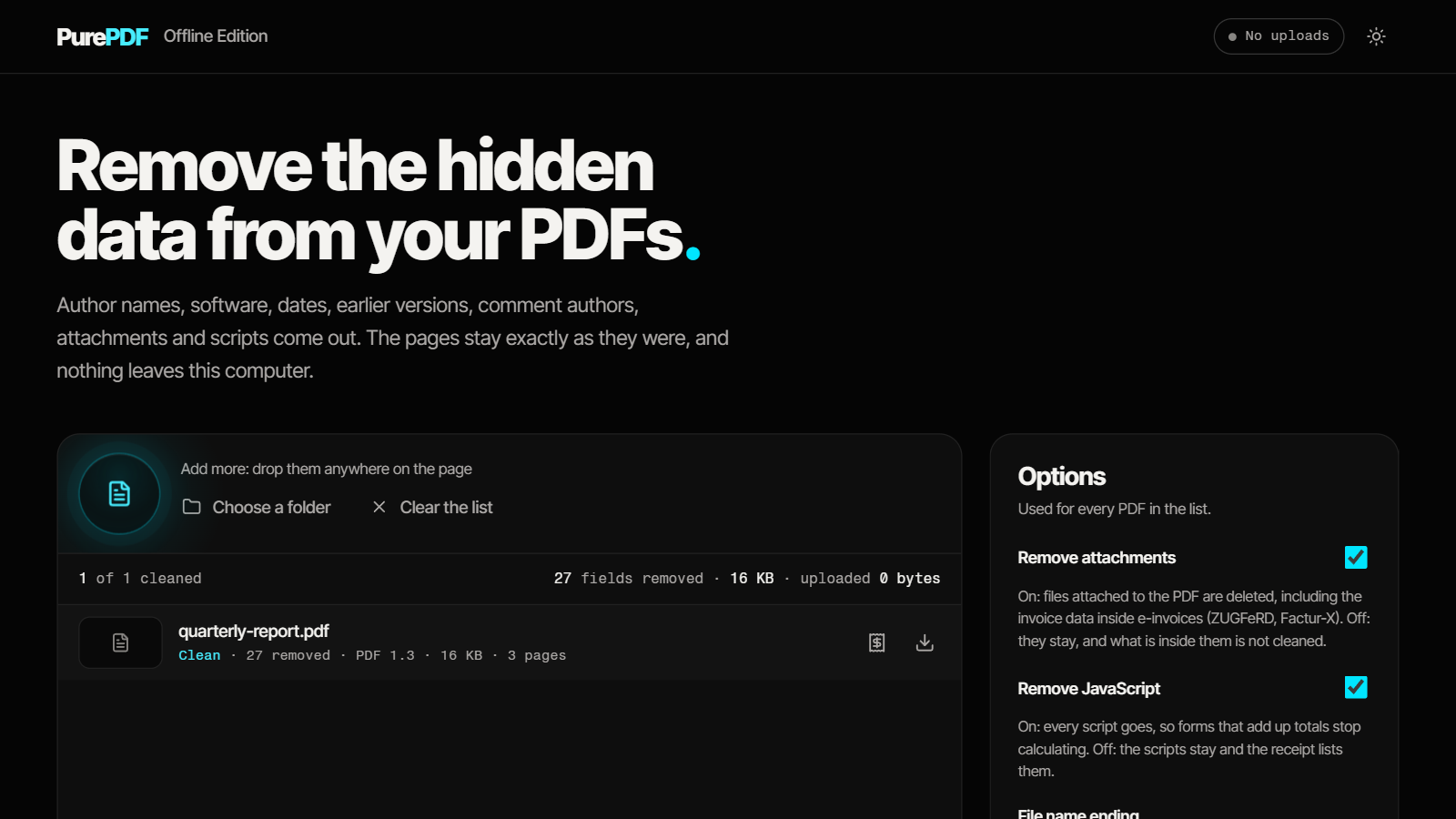
Every PDF gets a receipt of what was found and removed, and a read-back of the clean copy ("Hidden fields left: 0", "Reads back: 3 of 3 pages"). Download the copies or, in Chrome and Edge, save them straight into a folder.

PurePDF after cleaning the sample PDF: 1 of 1 cleaned, 27 fields removed, uploaded 0 bytes, next to the options for attachments and JavaScript
PurePDF after cleaning the sample PDF (made-up metadata, real removal).

Why PurePDF is different

A new file, not a patch

A PDF editor that "removes" a property often leaves the old value inside the file as an earlier version. PurePDF writes a new file with only what the current pages use, so the earlier versions are gone.

Nothing is re-rendered

Text, fonts and images are copied byte for byte into the new file, so the pages look exactly the same and the text stays selectable. Only the metadata inside JPEG and JPEG 2000 images is cut out, without re-compressing them.

Nothing is uploaded

Online PDF tools send your document to a server. PurePDF runs on your computer, and its security policy blocks every network request.

Show, don't claim

After cleaning, PurePDF reads the new copy again and prints what is left on the receipt. A copy that does not read back with every page is not offered for download.

Clean every PDF before you send it.

One HTML file that opens in Chrome, Edge or Firefox. No install, no account, no subscription, and no upload: the page has no permission to use the network.

  • Drop many PDFs or a whole folder at once.
  • Pages, text, fonts, images, links, bookmarks, form fields and comment text are kept.
  • A receipt for every PDF, with a read-back of the clean copy.
  • Password-protected PDFs are refused with a plain message; PurePDF does not try to open them.
  • Tested with files up to 106.5 MB.
  • Tested in Chrome, Edge and Firefox on Windows. Mac and Linux browsers should work but are not tested yet.
PurePDFOffline Edition: one file, yours to keep. Updates to version 1 are free.
Get PurePDF

Use it on your own computers, for personal and commercial work. Checkout and download through Gumroad. PurePDF is made for computers: phones do not open local web pages well.

What PurePDF does not do

How PurePDF is tested

Each release is checked against test PDFs with hidden data planted in the places real programs write it. A file passes only if no planted value is left anywhere in the clean copy and a second, independent PDF reader finds the same text and renders the same pixels before and after.

246

real PDFs cleaned and compared. The pages checked in each copy (up to three per file) rendered pixel for pixel like the original in two PDF engines: pdf.js, used by Firefox, and PDFium, used by Chrome and Edge. 5 more were refused because they were encrypted; none failed.

0

planted values left in the test PDFs (properties, XMP, saves over, object streams, attachments, scripts, comments, photos with GPS, a 106 MB file), searched for in the raw bytes, in every decoded stream and in the page text by a checker that shares no code with PurePDF.

3

browsers run the page in the tests: Chrome, Edge and Firefox on Windows. The downloaded copy is the same, byte for byte, as the engine's own output, and the page makes no network request.

Not tested yet: Adobe Acrobat and Reader, macOS Preview, Safari and Macs. None of the real PDFs had attachments or JavaScript, so those two removals rest on the test files only. If a receipt looks wrong for one of your files, write to support@karelialabs.com.

Questions

Is my PDF uploaded?

No. PurePDF is a file you open in your browser, and its security policy blocks every network request, so it also works with the internet unplugged.

How do I remove the author from a PDF?

Drop the PDF into PurePDF. The author in the document properties, the author in the XMP data, an earlier author still kept inside the file and the names of comment authors are removed, and the receipt lists each one. The comment text stays.

Does removing metadata change how the pages look?

No. Nothing is re-rendered: text, fonts and images are copied byte for byte into a new file, so the pages look the same and the text stays selectable. On 246 real PDFs, the pages checked in each copy (up to three per file) rendered pixel for pixel like the original in pdf.js and PDFium.

Why not just clear the properties in a PDF editor?

An editor that saves over a PDF often leaves the old values inside the file as an earlier version, with the old author and the old title. PurePDF writes a new file with only what the current pages use, and the receipt lists the earlier values it found.

Can it remove the GPS location from photos inside a PDF?

Yes, from JPEG images: the GPS position, camera, dates and software (EXIF), XMP, IPTC and comments are cut out without re-compressing the picture, and the colour profile is kept.

Can it open password-protected PDFs or remove a password?

No. Encrypted PDFs, also ones with only an owner password, are refused with a plain message. PurePDF does not try to decrypt them.

What happens to a digitally signed PDF?

The signature is kept, but it no longer checks out, because the clean copy is a new file. The receipt warns about it.

Does it redact text on the pages?

No. It removes hidden data, not what is on the pages. Names in the text, white text and words under a black box are page content; use a redaction tool for those.

How big can a PDF be?

Files up to 106.5 MB were tested. PurePDF reads the whole file into memory, so files of several GB may fail in a browser.

Does it work on a Mac?

It is a plain web page, so it should run in Chrome, Edge or Firefox on a Mac or on Linux, but so far it has been tested on Windows only.

Is it a subscription?

No. $14.99 once, with free updates to version 1. No account and no licence key.

Can I try it first?

There is no free test of PurePDF. What you see on this page is a real receipt from the tool, made from a sample PDF with made-up metadata, and the price is one-time: $14.99, no subscription.

Office files, photos and videos too