Phone videos carry where you filmed them, the exact phone and the time to the second. Action cameras and drones record your whole route in hidden tracks. PureVideo takes it all out of MP4 and MOV files on your own computer, and the picture and sound stay byte for byte the same.
This video carried its location, device details, dates, and hidden data tracks. All of it is gone now.
Location
GPS position48.8584° N, 2.2945° E, 35 m✕
GPS accuracy±4.7 m✕
Device & software
MakeApple✕
ModeliPhone 15 Pro✕
Software18.1✕
LensiPhone 15 Pro back camera 6.765mm f/1.78✕
Live Photo ID6F1A0C2E-8B6D-4D3A-9A1F-2C77E0D4B9A1✕
Software name in track headerCore Media Metadata, Core Media Video, DataHandler +1✕
Vendor code in video trackApple✕
Other fields: 1 more
Dates
Recorded2026-07-14T21:04:33+0200✕
Recorded (file header)2026-07-15 22:40:00 UTC✕
Track dates8 fields✕
Hidden tracks
Face positions, Orientation (Apple)12 samples✕
Kept
Picture and sound1 video, 1 audio tracks, untouched✓
Playsopened in this browser✓
Hidden fields left0
Bytes overwritten1.8 KB
Uploaded0 bytes
Removed14 fields
Processed on this device. Nothing left it.
Clean0 uploaded
A real PureVideo receipt for a sample file with made-up metadata.
What your videos give away
A video file is more than picture and sound. Phones, cameras, drones, editors and AI tools write data into it that no video player shows, and it travels with the file wherever you send it.
Location
GPS position and route
iPhones and Android phones store the place a video was filmed, often to a few meters. GoPro and DJI files can hold a GPS track, second by second, in a hidden data track.
Device
Phone, camera and serial
Make and model, lens, software version, camera and media IDs, firmware, and the names of the programs that wrote the file.
Dates
When, to the second
Recording and edit dates in the file header and in the tags, plus the time-of-day timecode many cameras write. Keep them if you want, with one switch.
AI & editing
Prompts and Content Credentials
C2PA / Content Credentials manifests, AI prompts and whole workflows (for example from ComfyUI), XMP editing history with project file paths that show your user name.
Hidden tracks
Data no player shows
Face positions and Live Photo data in iPhone videos, GoPro sensor and GPS streams, drone telemetry written as subtitles, camera motion data.
Text
Names and notes
Titles, comments, authors, keywords, cover images, store account names, and data that some cameras append after the end of the video.
How PureVideo cleans a video
PureVideo is one HTML file you open in your browser. It is not even allowed to use the network, so it works with the internet unplugged.
Drop
Drop videos or a whole folder: MP4, MOV, M4V or 3GP, any size. Nothing is uploaded; the file is read where it is.
Overwrite in place
The metadata is overwritten with zeros right where it lies. Nothing is re-encoded and nothing moves, so every frame and every sound stays exactly as it was. A 1.2 GB video takes about half a second.
Check the receipt
Each video gets a receipt of what was found and removed, a read-back of the cleaned copy ("Hidden fields left: 0") and a check that it still plays. Save the copies, or in Chrome and Edge, straight into a folder.
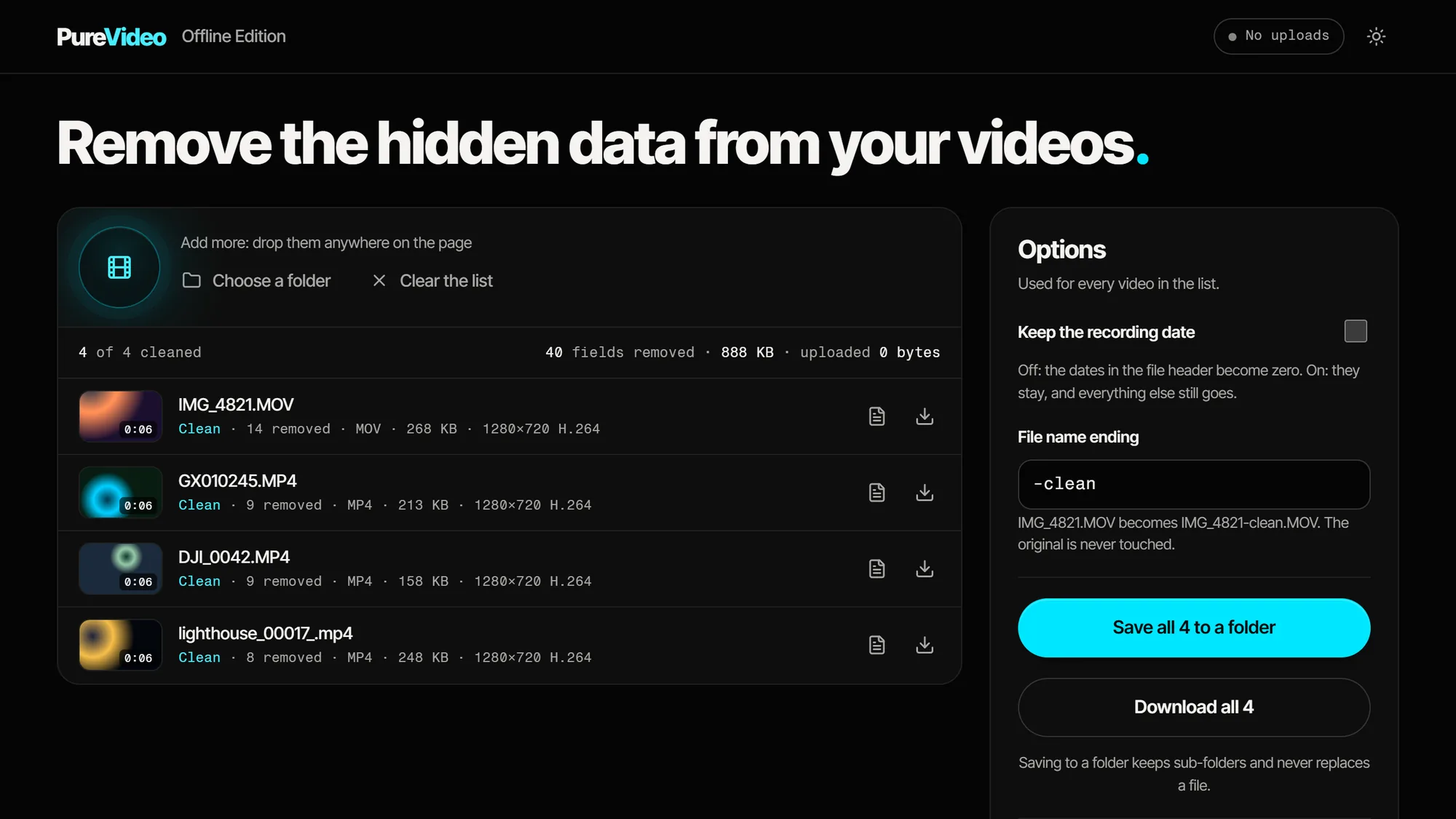
PureVideo after cleaning four sample videos (made-up metadata, real removal).
PureVideo and the other ways to do it
Way
Your video
What it removes
Quality
PureVideo
stays on your computer
GPS, device, dates, XMP, C2PA, AI prompts, hidden GPS and sensor tracks; shows each one on a receipt
untouched, no re-encoding
Online metadata removers
uploaded to someone's server
varies, often only the common tags
some re-encode the video
FFmpeg or ExifTool
stays on your computer
a lot, if you know the right options; hidden data tracks need extra steps
untouched with the right options
Phone share options
sent as usual
location only, one share at a time
depends on the app
Remove the location from a video without a tool
For one video now and then, your phone can do part of it. These steps remove the location only.
iPhone
To share without the place: in the Share sheet, tap Options at the top and switch off Location.
To stop saving it: turn off the location tag in the Camera app's settings (the name differs between phones).
Videos you already filmed keep their location until you clean them.
Windows
File Properties, Details, Remove Properties and Personal Information works on the fields Explorer shows. It does not touch data Explorer does not show, such as hidden GPS tracks.
Social media
Instagram, TikTok and YouTube re-encode what you upload and drop most metadata. Files sent by email, cloud link, AirDrop, as a document in a messaging app or posted on a marketplace usually keep all of it.
PureVideo · Offline Edition
Clean every video before it leaves your computer.
One HTML file that opens in Chrome, Edge or Firefox. No install, no account, no subscription, and no upload: the page has no permission to use the network.
Drop many videos or a whole folder; the folder structure is kept when you save.
MP4, MOV, M4V and 3GP (also M4A audio), any size. Tested up to 4.6 GB.
Picture and sound byte for byte unchanged: nothing is re-encoded.
A receipt for every video, with a read-back of the cleaned copy.
Keep the recording date if you want; everything else still goes.
Damaged or unfinished recordings are refused, never half-cleaned.
Tested in Chrome, Edge and Firefox on Windows. Mac and Linux browsers should work but are not tested yet.
Built from the published file formats of iPhone, Android, GoPro and DJI; not every device has been run through it yet.
Personal and commercial use. Updates to version 1 are free. Bought on a phone? The download link is emailed to you; PureVideo is made for computers.
What PureVideo does not remove
What you can see or hear: faces, voices, street signs, a watermark in the picture.
Invisible watermarks woven into the pixels, such as Google SynthID. It is not a way to hide that a video was made with AI.
Encoder settings that some programs write inside the video stream itself.
iPhone extras that live in metadata (Live Photo pairing, slow-motion ramps, Cinematic focus) are removed with it, so export your edit from Photos first.
Questions
Is my video uploaded?
No. PureVideo is a file you open in your browser, and its security policy blocks every network request, so it also works with the internet unplugged.
Does removing metadata lower the video quality?
No. Nothing is re-encoded. PureVideo overwrites the metadata with zeros where it lies, so the picture and the sound stay byte for byte the same.
Can I remove the GPS location from an MP4 or MOV without re-encoding?
Yes, that is what PureVideo does. The location in the tags, in Apple's QuickTime keys and in hidden GPS tracks is wiped, and the video and audio data are not touched.
Does it remove C2PA Content Credentials from AI videos?
Yes. The manifest is removed, together with XMP data and AI prompts or workflows stored in the file. Invisible watermarks in the pixels, such as Google SynthID, are not metadata and stay, so it is not a way to hide that a video was made with AI.
Which files does it support?
MP4, MOV, M4V and 3GP, and M4A audio. Not supported: MKV/WebM, AVI, MTS/AVCHD and WMV; convert those to MP4 first.
How big can a video be?
Any size. PureVideo reads only the parts that hold metadata, so a 1.2 GB video takes about half a second. Files over 4 GB were tested too.
Does it work on a Mac?
It is a plain web page, so it should run in Chrome, Edge, Firefox or Safari on a Mac, but so far it has been tested on Windows only.
Is it a subscription?
No. $19.99 once, with free updates to version 1. No account and no licence key.
Can I try it first?
Yes. The free test on this site cleans one video on your device, in your browser, with nothing uploaded. Open it at pureimage.online/purevideo/try.html.
Does it remove the AI info label on Instagram?
It removes the C2PA Content Credentials and the IPTC and XMP AI fields from the file, which are the signals platforms read from the file itself. Checked with the official C2PA tool: after cleaning it finds no claim. A platform can still label a video from invisible watermarks in the pixels (such as Google SynthID), its own analysis or your own disclosure, and Meta asks you to label realistic AI video yourself.
Is there a free version?
There is a free test of one video per device. PureVideo itself is $19.99 once. For photos, PureImage on this site is free and runs in your browser.